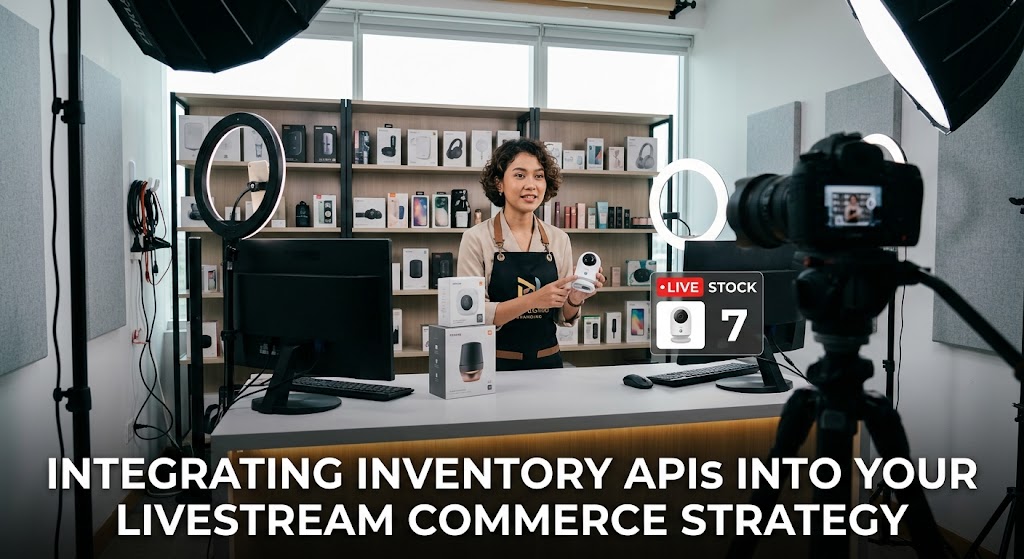
The host is already hyping the final five units when someone in the warehouse whispers the nightmare: “We sold out five minutes ago.” That’s exactly where a livestream commerce strategy can fall apart. The fix isn’t another spreadsheet. It’s a real-time connection between your store, inventory database, and the graphic sitting on top of the broadcast.
The interesting part is that the technology already exists. Shopify exposes inventory quantities by item and location, while WooCommerce provides stock quantities through its REST API. The real challenge is making those systems talk to your broadcast quickly enough that the audience sees what is actually available.
1. How Inventory API Integration Keeps Livestream Commerce Strategy Accurate
A good setup starts with one simple rule: your ecommerce backend remains the source of truth.
Shopify, for example, separates product variants, inventory items, locations, and inventory levels. That matters when one SKU is stored in multiple warehouses. WooCommerce similarly exposes stock_quantity and stock-management states through its API.
Build Around SKU and Variant IDs
Don’t make the overlay search for product names such as “Blue Hoodie.” Names can change. SKUs and variant IDs are safer identifiers.
Your basic data flow should look like this:
Store → Inventory API → Middleware → Overlay → Livestream viewer
For Shopify, newer integrations should generally use the GraphQL Admin API rather than building new functionality around the legacy REST product-variant endpoints. Shopify explicitly identifies those REST variant endpoints as legacy.
Shopify and WooCommerce Need Different Handling
A Shopify installation may need to distinguish inventory by location. WooCommerce can expose product-level or variation-level stock.
That means your middleware should normalize the response into something simple:
SKU: SHOE-42-BLK
Price: $89
Available: 7
Status: LOW_STOCK
The overlay doesn’t need to understand the entire ecommerce system. It only needs the clean result.
Don’t Poll Every Second Without a Reason
A common mistake is hammering an API continuously just to make a number look “live.”
A better architecture combines API reads with event-driven updates where available. Cache product information, refresh stock when an order occurs, and use webhooks or equivalent events to trigger updates.
This reduces unnecessary requests while keeping the displayed quantity useful.
Real Time Overlays Need a Fallback
Even good APIs fail occasionally.
If the inventory service becomes unavailable, don’t leave a misleading “Only 2 left” badge frozen on screen.
Use states such as:
- LIVE STOCK
- CHECKING STOCK
- TEMPORARILY UNAVAILABLE
- SOLD OUT
OBS is particularly useful here because its Browser Source can load a web page directly into a scene, making web-based overlays practical without rebuilding the entire broadcast layout.
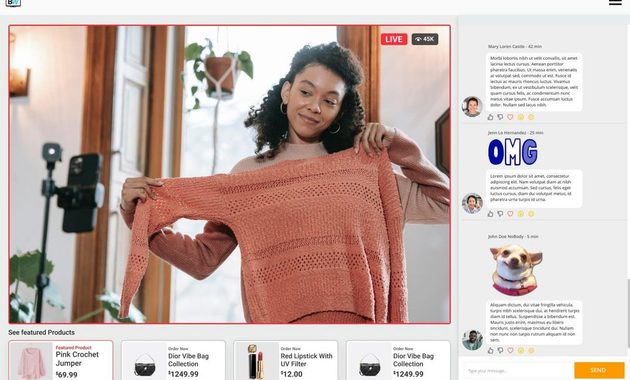
2. Real Time Overlays, Ecommerce Backend Logic, and the FOMO Trigger
The visual overlay is only the tip of the iceberg. Behind it sits the e commerce backend, where inventory, pricing, orders, and product variants have to agree.
A practical architecture can be surprisingly lean:
- Store API supplies product and stock data.
- Middleware converts it into a broadcast-friendly format.
- WebSocket or polling layer pushes updates to the overlay.
- OBS Browser Source displays the result.
- Checkout confirms the transaction and changes inventory.
The important distinction is between displaying stock and reserving stock.
Suppose the API says there are 10 units available. Ten viewers can see “10 left.” But if three shoppers click Buy at almost exactly the same moment, your system needs a proper reservation or checkout mechanism to prevent overselling.
That’s why modern live-shopping systems increasingly use temporary inventory reservations, low-stock warnings, and sold-out states rather than simply displaying a number.
For the same reason, FOMO triggers should be factual rather than fabricated. “3 left” is useful when the system actually knows there are three available. A fake countdown may create urgency, but it also creates a trust problem.
This is where the broader production strategy matters. If you want to see how live selling is evolving on major platforms, our review of TikTok livestreaming commerce in 2026 gives useful context.
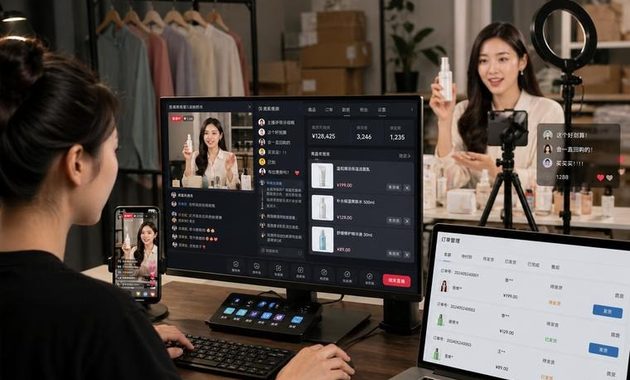
3. Making Livestream Commerce Strategy Fast Enough for Real Sales
The goal isn’t literally zero milliseconds. The goal is eliminating visible contradictions.
If a host says “five left” while the checkout says “sold out,” viewers don’t care which database caused the problem. The brand simply looks unreliable.
Set a Practical Latency Budget
Think in layers:
- Inventory change
- API or event delivery
- Middleware processing
- Overlay update
- Viewer delivery
- Checkout confirmation
If your stock overlay updates within a second or two but checkout remains authoritative, that’s usually more valuable than pretending every component is perfectly instantaneous.
Use Reservation Logic for Hot Drops
For products expected to sell rapidly, consider a temporary hold.
A simplified flow is:
Viewer clicks → stock validated → unit reserved → checkout window opens → payment succeeds → inventory decremented
If payment fails or the hold expires, the unit returns to available stock.
This approach is already reflected in commercial live-shopping systems that support temporary reservations and oversell protection.
Keep the Overlay Useful
Don’t cover the host with six flashing boxes.
A strong product card normally needs:
- Product name
- Current price
- Discount, if genuine
- Available stock or stock status
- Clear purchase action
That’s enough.
Your livestream commerce strategy becomes much stronger when the technology disappears behind the experience. The host can focus on explaining the product while the system quietly handles stock, pricing, and checkout.
What Should You Test Before Going Live?
Run at least these scenarios:
- One viewer buys the last unit.
- Two viewers attempt the last unit simultaneously.
- The product sells out during the presentation.
- The API becomes temporarily unavailable.
- A customer abandons a reserved cart.
- A product price changes before the stream.
- The host switches to another SKU.
If those seven cases behave correctly, you’re much closer to a production-ready setup.
Q&A
Can OBS directly manage ecommerce inventory?
Not by itself. OBS is primarily the broadcast layer. The inventory logic should live in your ecommerce system or middleware, with OBS displaying the resulting web overlay.
Should the stock number shown on screen always be exact?
Only if your architecture can keep it sufficiently fresh. Otherwise, use safer states such as “Low Stock” rather than displaying an exact number that may already be outdated.
Is Shopify or WooCommerce better for livestream selling?
Neither is automatically better. Shopify offers a mature inventory model with location-aware inventory resources, while WooCommerce provides accessible REST endpoints for stock management. The better choice depends on your existing store, fulfillment workflow, and integration budget.

Nadira Wicaksana is a former social media listening analyst who has monitored creator trends, viral broadcasts, platform updates, and audience conversations across Southeast Asia. She has worked with digital agencies and consumer brands to identify new livestream formats before they become widely adopted. Her articles examine what is gaining attention, why audiences respond to it, and whether a trend has lasting value or is simply passing noise.